Showing posts with label writing. Show all posts

Saturday, June 30, 2012

Top 10 Writing Apps For the iPad

Evernote (Free) is an easy-to-use, free app that helps you remember everything across all of the devices you use. Stay organized, save your ideas and improve productivity. Evernote lets you take notes, capture photos, create to-do lists, record voice reminders--and makes these notes completely searchable, whether you are at home, at work, or on the go.

http://itunes.apple.com/gr/app/id281796108?mt=8&src=af&affId=1788472&ign-mpt=uo%3D6


Penultimate (0.79E).The original, easiest-to-use, and best-selling handwriting app for iPad. Penultimate gives you the fast, tactile gratification of writing on paper, with digital power and flexibility. Take notes, keep sketches, or share your next breakthrough idea -- in the office, on the go, or home on the sofa.

http://itunes.apple.com/gr/app/id354098826?mt=8&src=af&affId=1788472&ign-mpt=uo%3D6

Notability (0.79E) is optimized for the new iPad! It powerfully integrates handwriting, PDF annotation, typing, recording, and organizing so you can take notes your way! Discover the freedom to capture ideas, share insights, and present information in one perfect place on iPad.

http://itunes.apple.com/gr/app/id360593530?mt=8&src=af&affId=1788472&ign-mpt=uo%3D6


Pages (7,99E) is the most beautiful word processor you’ve ever seen on a mobile device. This powerful app has been exclusively designed for the iPad, iPhone, and iPod touch. Create, edit, and view documents wherever you are. Pages works with iCloud, so your documents stay up to date on all your iOS devices — automatically. And the Retina display on the new iPad makes everything you do in Pages even more brilliant.

http://itunes.apple.com/gr/app/id361309726?mt=8&src=af&affId=1788472&ign-mpt=uo%3D6


GoodReader® (3,99E) is the super-robust PDF reader for iPad - the #1 selling non-Apple app for iPad in USA in 2010! Mashable describes it as “a Swiss Army knife of awesome!” Reviews worldwide hail it as “essential,” “the best,” “magnificent” and “the killer app”. With GoodReader on your iPad, you can read virtually anything, anywhere: books, movies, maps, pictures. Use it once and you’ll be hooked. Soon you'll be wondering how you ever managed to use your iPad without GoodReader.
http://itunes.apple.com/gr/app/id363448914?mt=8&src=af&affId=1788472&ign-mpt=uo%3D6


TouchDocs (2,99E) Google Docs and Google Drive on iOS! TouchDocs is the easiest way to view, edit, and manage Google Docs and Google Drive on your iPad, iPhone, or iPod Touch.

http://itunes.apple.com/gr/app/id376317035?mt=8&src=af&affId=1788472&ign-mpt=uo%3D6


iA Writer (0.79E) The quintessential writing machine for your iPad and iPhone. iA Writer makes sure that your thoughts go into the text—and not into the program. With keyboard extension, focus mode, iCloud and Dropbox integration.

http://itunes.apple.com/gr/app/id392502056?mt=8&src=af&affId=1788472&ign-mpt=uo%3D6


Blogsy (3,99E) is a tool designed specifically to take full advantage of the iPad’s unique touch functionality. Adding your photos and videos is as easy as dragging them from the media sidebar and dropping them into your blog post. This makes writing blog posts as easy as it should be, saving you from the hassle of jumping from app to app to manually copy/paste embed codes or links. Simply put, we think that Blogsy makes writing so easy that you will use it instead of your computer.
http://itunes.apple.com/gr/app/id428485324?mt=8&src=af&affId=1788472&ign-mpt=uo%3D6


Bamboo Paper (Free), a seriously fun new app from Wacom, provides you with the ability to create virtual notebooks for your iPad, letting you share your ideas visually with handwritten notes, sketches or doodles. Paired with the Bamboo Stylus, it turns your iPad into the ultimate paperless communications tool for use at

http://itunes.apple.com/gr/app/id443131313?mt=8&src=af&affId=1788472&ign-mpt=uo%3D6


Plain Text (Free) - For editing text on your iPad, iPhone, or iPod Touch. PlainText is a simple text editor with an uncomplicated, paper-like user interface. Unlike the default Notes app, PlainText allows you to create and organize your documents in folders and sync everything with Dropbox.com.


http://itunes.apple.com/us/app/plaintext-dropbox-text-editing/id391254385?mt=8


Friday, February 10, 2012

3 Amazing Apps for Creating your Own Flashcards on iOS

Flashcards are effective for children of really any age. However one of the areas they are most often used is in the early years of school. They are generally thought an excellent way to improve phonics and spelling abilities.  Here are some excellent mobile apps for iPad & iPhone:


Flashcards+ (free) is one of the most popular flashcard app. It was designed in association with Harvard University faculty and students. Flashcards+ is an optimized way to learn and retain new information. It allows you to easily create and study flashcards without the hassle of having to buy and write on actual notes. 


http://itunes.apple.com/gr/app/flashcards+/id408490162?mt=8


 Here are some screenshots of this app:


---------------------------

Flashcardlet is a free, easy to use studying application with material from any class or standardazed test. You can also create and share your own. It is the best way to study on any iOS device.


http://itunes.apple.com/gr/app/flashcards*/id403199818?mt=8


Here are also some screenshots from Flashcardlet:


-----------------------------


        Flashcards (1.59E) is designed to make it easy for you to create your own flashcards on iphone. It is simple to generate sets of your own flashcards. You can add texts, pictures or even audio.  


http://itunes.apple.com/gr/app/flashcards/id290008445?mt=8       


Monday, January 23, 2012

3 Must-Have Free Organizers for Teachers & Students

Note-taking is really important. Either if you are a teacher or a student you need a notebook to note down your thoughts, a lecture's main points,  make to-do lists, brainstorm for an assignment or a presentation etc. Here are some worth using note-taking apps for iPad:

 Awesome Note, which is free, is an integrated organizer of your life. Even had ideas and thoughts that flash through your mind? Were you able to write them down? What about tracking your your daily schedule & To-Dos? Besides, keeping your own diary is a delightful experience. Awesome note has all these in one.

Notes can be send via email or via SMS with photos, drawings and a map attached. Instant on the site print is also available. For safe storage, Google Docs/ Evernote are ready to help sync and backup your data.

You can download the app here:


Spring Pad is a free application that lets you easily save the ideas and information you want to remember - on the web, on your phone and your iPad. It is a really worth downloading

You can download the app here:


Evernote is one of the most useful i-friendly applications. Evernote allows you to capture information in any environment using any device, and makes everything accessible and searchable, from anywhere. Evernote is always synchronized, so any information added in one place is instantly available everywhere else. Use Evernote to capture your ideas, snapshots, voice memos, things you see online, and just about anything else that you want to remember.

You can download the app here:
http://itunes.apple.com/gr/app/evernote/id281796108?mt=8


Friday, January 13, 2012

Your digital notebook: Evernote - Free

Evernote is one of the most useful i-friendly applications. Evernote allows you to capture information in any environment using any device, and makes everything accessible and searchable, from anywhere. Evernote is always synchronized, so any information added in one place is instantly available everywhere else. Use Evernote to capture your ideas, snapshots, voice memos, things you see online, and just about anything else that you want to remember.  It can be used at your ipod, iphone, ipad and on windows. You can access the window's application here: http://www.evernote.com/evernote/


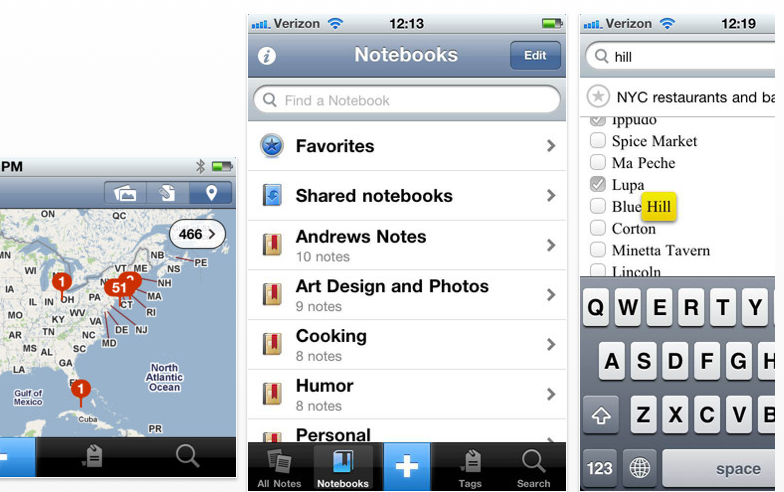
Here are some snapshots of Evernote:


You can download it here:

or scan this code and get the link to your mobile device:


Thursday, January 5, 2012

Teach ABC with a magnetic alphabet


  Magnetic Alphabet is a great tool for everyone. It aids in teaching preschoolers their alphabets/numbers, a learning tool in teaching one how to spell or sending messages to friends and family! The characters on the app are rendered beautifully and provided with nominal sound effects! Magnetic Alphabet is recommended for kids of all ages, especially to those parents with kids who are just beginning to learn their alphabet and numbers. At the free version, there are all the letters of the  alphabet available but numbers and some other sticker characters can be purchased for 1,59E. However, I did not need the numbers with my student and only worked with the letters.


or scan this code and get the link to the app: